All of the tasks in this assignment require that you produce
program code in a well organised, well annotated way, with good names for
your variables and form controls. Also, you must produce a user
friendly input and output screens,
So, the first thing you should do is to create the input
and output form.
As an example - here is my unfinished input form.

~~Activity~~
|
Activity A |
|
Click the link to open and run my
unfinished Seed Calculation program
|
Your Task
Open up Visual Basic and create your user
interface, following your form design sketches from your previous assignments.
Remember, for assignment 1 part d
you sketched your forms by hand. For assignment 2 you should have reproduced your sketches in
Word.
When you have finished creating your forms, print them out.
Write your name
at the top of the page and a heading such as Assignment 3: Input form
Now you have now created your input and output
forms, your next task is to give each of your input and output controls
a proper name.
In assignment 2 part
b
you were asked to put names for your controls on your input and output form
drawings. If you did complete this task then it will be easy for you to
name your controls in VB. If you didn't do this, I suggest you start
this task by making a quick list of good names for you controls.
Remember, there are naming conventions to follow when naming
controls. Each controls start with different three letter prefix...
| Control |
Prefix |
|
| Form |
frm |
| Command Button |
cmd |
| TextBox |
txt |
| Label |
lbl |
| CheckBox |
chk |
| OptionButton |
opt |
| Frame |
fra |
| Shape |
shp |
| Line |
lin |
|
Timer |
tmr |
When naming a control, you need to use
the three letter prefix first, then the rest of the name
should relate to the function of the control - it should
describe something about it, so when you come across the
name in your code, you know exactly which control it is.
~~Activity~~
|
Activity B |
|
Try this flip card activity
to see if you can remember the correct prefixes
|
Here as some naming examples
Examples:
-
What would you name command button that ends a program when
clicked?
cmdExit or
cmdEnd or something similar
-
What would you name a text box that expects a user to
type in their first name?
txtFirstName or something similar
-
What would you name a label that displays the height of
a room
lblRoomHeight or something similar
~~Activity~~
|
Activity B |
What do you think I named the command buttons shown in the picture?
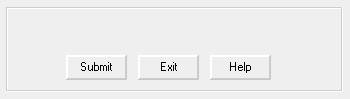
Answer
What about the controls on the form below?
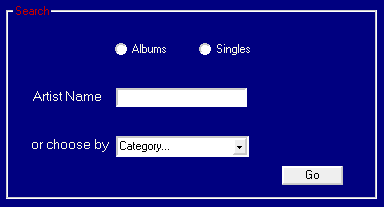
Answer
|
Now you need to consider how to name the controls on your
own form. My advice is only to name any controls you think you will refer to
in your code. This is likely to be all command buttons, textboxes,
checkboxes etc. Controls you may not need to name are labels and
frames, unless of course you will need to refer to any of them in your code.
Thinking of good names for controls on your seed calculation
program will take some thought. To start you off, here's how I named
some of the controls on my form.
... can you guess the names first?
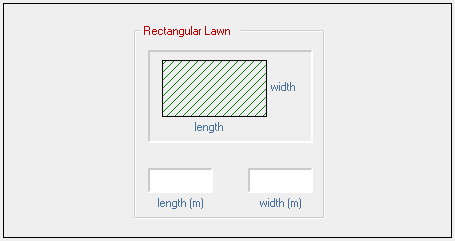
Answer
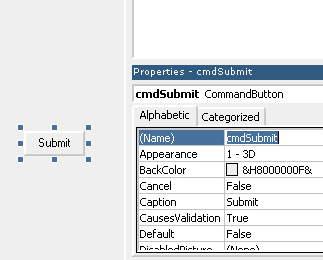
Can you remember how to change the names of controls?
You have to select that control and then type in the name you want in the
properties window. Look at the picture below showing the name of the command button
being set.
Your Task
Now it's your turn to name all your input and output controls:-
When you have finished creating your forms, print out the
form
code. You can do this by clicking Print and then ticking Form
in the Print box that appears.
Write your name at the top of each page and a heading such
as Assignment 3: Control Names


